
Playlist guide
IPTV M3U – Playlist Guide
M3U is the playlist format behind most IPTV players. If an app asks you for an “M3U URL”, this guide explains what that is, when to use it instead of an Xtream login, and how to add it on every common device.
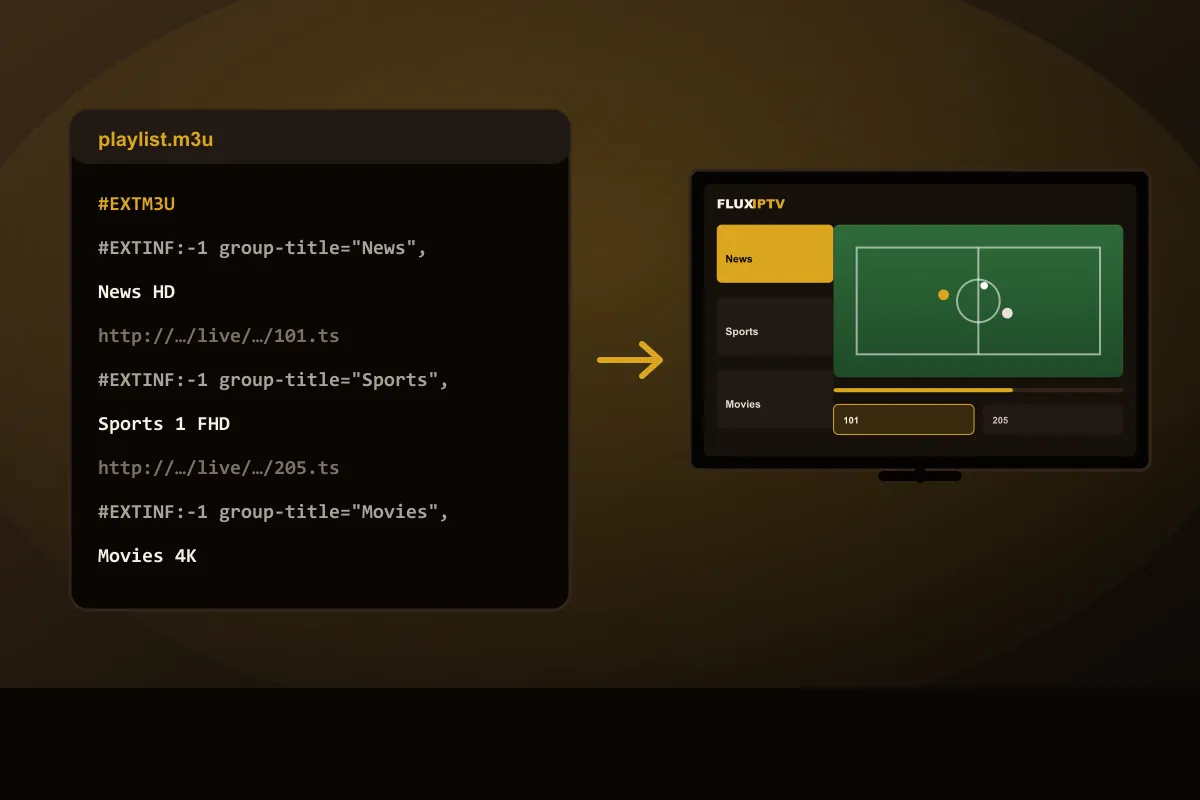
In short: An IPTV M3U playlist is a text file (usually delivered as a URL) that lists channel names, categories and stream addresses. You paste the M3U URL into a compatible player app, which turns it into a channel list; an EPG link adds the program guide. When an app supports it, an Xtream-style login is usually simpler because it also loads movies, series and the guide.
What is an IPTV M3U playlist?
M3U started as a simple playlist format for music players. IPTV uses the same idea: an IPTV M3U file is a plain text list where every entry has a channel name, a category (“group”) and the address of its stream. A player app reads the file and turns it into the channel list you scroll through on your TV.
A shortened example looks like this:
#EXTM3U
#EXTINF:-1 tvg-id="news.hd" group-title="News",News HD
http://example-server/live/user/pass/101.ts
#EXTINF:-1 tvg-id="sports1" group-title="Sports",Sports 1 FHD
http://example-server/live/user/pass/205.ts#EXTM3Umarks the start of the playlist.#EXTINFlines hold the channel name, its guide ID (tvg-id) and category (group-title).- The line underneath is the stream address.
Providers almost never send the file itself. You get an M3U URL, a link that always returns the latest version of your playlist, so channel changes appear automatically.
IPTV M3U vs Xtream login
| M3U URL | Xtream-style login | |
|---|---|---|
| What you enter | One long link | Username, password, server URL |
| Live TV | Yes | Yes |
| TV guide (EPG) | Needs a separate EPG link | Loaded automatically |
| Movies & series library | Often missing or flat | Organized sections |
| Supported by | Almost every player | Most IPTV-specific players |
Rule of thumb: use the Xtream login when your app offers it, as in the IPTV Smarters guide. Use the M3U URL for players that only accept playlists, and for general media players.
The EPG link (XMLTV)
An M3U playlist contains channels, not schedules. The program guide comes from a second link in XMLTV
format. Players match the two using the tvg-id on each channel. If your guide stays empty
after adding an M3U playlist, the EPG link is usually what's missing.
How to add an IPTV M3U playlist
- 01
Open your player
Choose “Add playlist”, “Load URL” or “M3U URL” (the wording varies by app).
- 02
Paste the M3U URL
Copy the full link we send, including everything after the question mark. Give the playlist any name.
- 03
Add the EPG link
If the app asks for an EPG or XMLTV URL, paste the guide link we send so program times appear.
- 04
Load and check
The player downloads the list. Check a few channels in different categories and set the guide time zone.
M3U playlists on each device
- Smart TV (Samsung, LG): many TV players are activated with a device ID; you add the M3U URL on the developer's website or in the app. See the Smart TV guide.
- Fire TV Stick: paste the URL in the player's “Add playlist” screen. Using the player's phone companion or a short link avoids typing it with the remote. See the Firestick guide.
- Android TV / Google TV: most players from Google Play accept an M3U URL directly.
- iPhone, iPad, Apple TV: App Store players support M3U; some sync the playlist from phone to Apple TV.
- Computer: general media players can open an M3U URL as a network stream, but an IPTV player gives you categories and a guide.
Troubleshooting M3U playlists
“Playlist failed to load”
Make sure you copied the entire link. Messaging apps sometimes break long URLs across lines. Paste it into your phone's browser first: if it downloads a file, the link is fine.
The list loads very slowly
Large playlists take time on older devices. Switch to the Xtream login, which loads categories on demand.
Channels load but don't play
Try another stream format in the player settings (HLS or MPEG-TS), then check Wi-Fi and restart the device.
Keep your playlist link private
Your M3U URL usually contains your username and password. Don't post it online or share it outside your household; shared links can be disabled under our terms.
Test it with a free playlist link
Request a 24-hour free trial and we'll send an M3U URL, an Xtream login, or both. Then run the IPTV test checklist and compare the plans.
IPTV M3U questions
What is an IPTV M3U link?
It is a web address that points to a playlist file in M3U format. The playlist lists each channel’s name, category and stream address, and your player app reads it to build the channel list.
Is an M3U file the same as an IPTV service?
No. The M3U file is only a list. The streams it points to come from the IPTV service, and the link stops working when the subscription or trial ends.
M3U or Xtream login: which should I use?
Use the Xtream-style login when your app supports it: it loads the guide and movies and series automatically. Use M3U when your app only accepts playlists.
Why does my M3U playlist not load?
The most common causes are a cut-off URL, an expired trial, or a player that cannot handle a very large list. Copy the full link again or try the Xtream login instead.
Can I get an M3U link for a free test?
Yes. With the 24H free trial we can send an M3U URL, an Xtream-style login, or both. Just say which your app needs.
Need an M3U link to test?
Request a 24-hour trial on WhatsApp and tell us whether your app needs an M3U URL or an Xtream login.